

In Verbleif you run the daily work at your park through tasks, reports and properties. You plan and track work in the web app, carry it out on your phone and keep everyone aligned. This article explains at a high level what you find in Verbleif and what you use it for.
What is this and why
Verbleif is not a loose to-do list or report inbox. It is one place where all facility work comes together: from a cleaning task on a changeover day to a leak a guest reports. Everyone works from the same properties, statuses and history, so no one has to call to ask whether a unit is already clean.
Suppose a property at your park must be cleaned on a changeover day. In Verbleif that task sits on the property with a deadline, assignment and status. A colleague at reception sees progress in the web app; the cleaner completes the task in the mobile app. The same pattern applies to reports, technical work and overviews.
Tasks
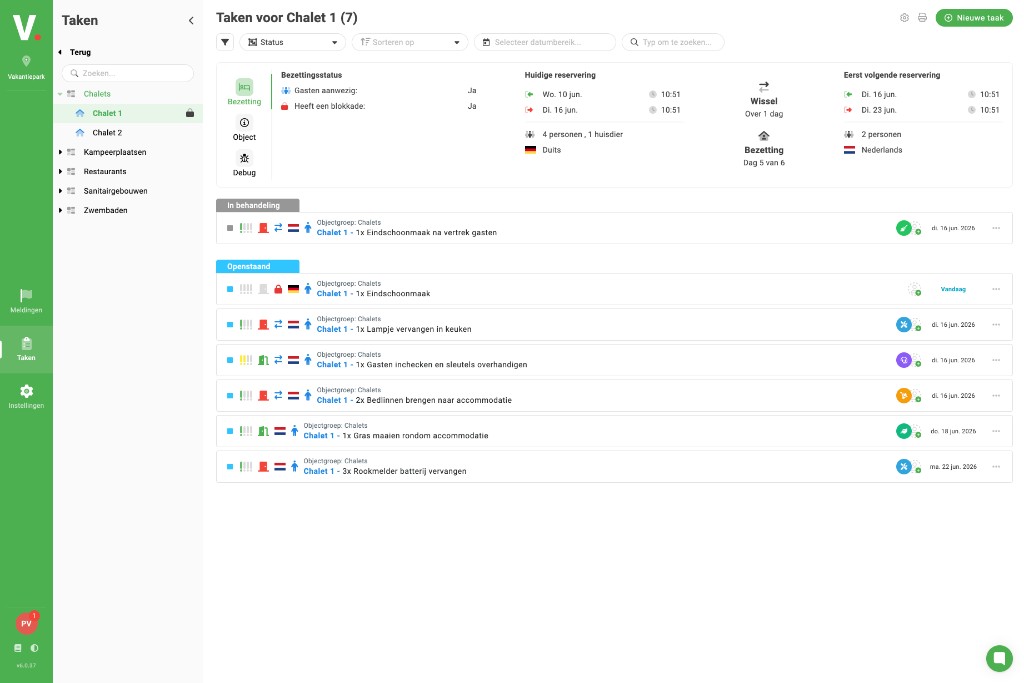
A task is concrete work someone must do. You find tasks in lists such as Tasks in the web app and on the Tasks tab in the mobile app. Per task you see the linked property, deadline, status and who is doing the work. You can create tasks, assign them, add photos and notes and complete them with a status such as Done.
Reports
A report records that something was noticed: a broken lamp, a leak or guest feedback. You register reports under Reports. From there you can review a report and convert it into a task for the right department, so the work does not stay stuck in email or on a note.
Properties
A property is an accommodation or pitch at your park. Under Properties you see per property its status, open tasks and reports and its history. That way you know at a glance which properties are ready, occupied or still need work.
Mobile work and offline
On the grounds you work in the mobile app. Your tasks and properties are stored locally on your phone so you can keep going when the network drops briefly. Once you are back online, Verbleif syncs your changes with the rest of the team. You also receive push notifications when new work is waiting for you.
Good to know
Permissions: Not everyone sees every list or button. What you can do depends on the permissions your administrator set up.
Sorts drive fields: The type of work (cleaning, legionella, general) determines which fields you see on a task or report. Your administrator configures that.
Automatic tasks: Verbleif can create tasks automatically around changeover days or fixed moments. The Verbleif team sets that up with your administrator.
See also
What is Verbleif?
What Verbleif is and how the web app and mobile app work together.
Who is it for?
Which teams use Verbleif and how permissions determine what you see.
Computer and phone
Web app for planning, mobile app for work on the grounds.